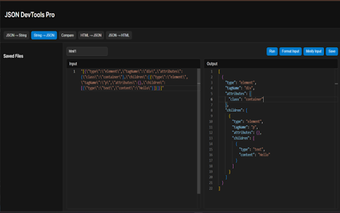
JSON File Manager Pro: In‑browser JSON editing and conversion toolkit
JSON File Manager Pro, from dainik.arthania, is a Chrome extension that provides an in‑browser workspace for JSON editing. It lets developers format, minify, validate, and reuse JSON payloads directly in the browser, enabling quick payload adjustments, conversion helpers, and visual comparison without switching to external editors. Built-in tools include local file storage, one‑click beautification and minification, split‑pane viewing, conversion helpers, and syntax‑aware editing aids and export options. It targets frontend and backend developers who need fast, local JSON tooling integrated into browser workflows.
What conversion and transformation workflows it supports
The tool concentrates on format and type conversion tasks that commonly appear in development workflows. Conversion utilities include automatic JSON-to-TypeScript interface generation, HTML-to-JSON AST transformation, string-to-JSON escaping, and tools to prepare API payloads for typed codebases. For developers who regularly adapt responses into typed models, these conversions reduce manual mapping steps and produce ready-to-use interfaces for integration into a code repository.
How editing and comparison behave inside the browser
The tool embeds the Monaco Editor to deliver an IDE-like editing surface with syntax highlighting, bracket matching, and on-the-fly validation. It also includes a visual diff mode for side-by-side comparison so additions, deletions, and changes are easy to spot during code review or payload testing. That combination lets developers inspect structural changes without exporting files to an external diff utility.
How data is stored and what the privacy model is
The extension operates on a privacy-first, offline-only model: all payloads and files are kept in the browser using Chrome Storage and nothing is sent to external servers. A local File Manager lets users save, edit, and reuse frequently used JSON snippets, keeping test payloads and fixtures available across sessions while remaining confined to the browser environment.
Where it fits in a developer workflow and its deployment limits
The developer built the tool for engineers who need a quick, browser-based JSON workspace rather than a team collaboration platform. It installs as a Chromium extension, so it runs in Chrome and other Chromium-based browsers. Expect a single-user, in-browser experience: the offline design prevents automatic cloud sync or shared, server-hosted payload libraries, which affects cross-device collaboration for distributed teams.
A practical, local JSON workspace for individual developers
JSON File Manager Pro is a focused choice for individual frontend or backend engineers who require fast, in‑browser JSON editing and conversion without sending data off the device. Its offline, extension-bound model favors private, single-user workflows; teams that need synchronized, shared payloads should consider server-backed tools instead. Use it as a personal JSON lab for preparing typed interfaces and testing payloads before committing them to source control.